Click on image to enlarge.
Sections: 1 | 2 | 3 | 4 | 5 | 6 | 7 | 8 | 9 | 10 | 11 | Index | Next >
Learning objective: Explain the logical/physical representations of files
Click on image to enlarge.
When a user makes a request to save a file, several key events happen that need to be managed by the operating system. The scenario below is Microsoft centered, but it is similar to how other operating systems manage a file.
Saving a document
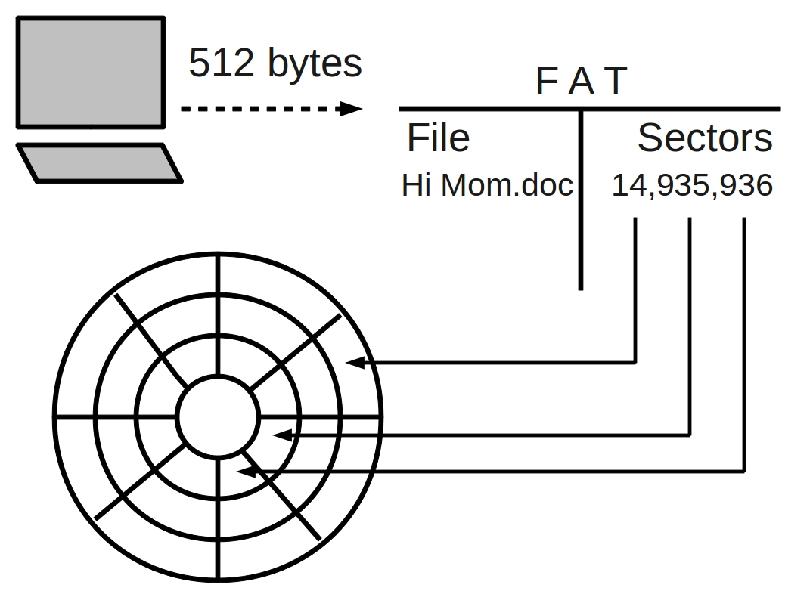
When a user wishes to save a file, the data in the computers memory is streamed out to the File Allocation Table. As it move towards the FAT, the data is broken up into chunks of 512 bytes. Most documents will be made up of many 512 byte chunks. 512 is used because it is a binary derivative, and computers utilize binary communications.
File allocation table
The File Allocation Table translate the logical filename of the user into the physical representation of the file into sectors available on a storage device. In FAT32 and NTFS system, the FAT includes both the long name of 255 characters that we take for granted today as well as the short file name using the older 8.3 conventions to maintain backwards compatibility. In this example, the file "Hi mom.doc" is mapped to sectors 14, 935, and 936 based on available sectors and position of the read/write head at the time of request. The short name would be "HIMOM~1.DOC" if that name was not already taken in the target directory.
Mapping data to available sectors
When a storage device is formatted, two main things occur. First the device is broken into sequential storage bins called sectors. The normal storage capacity of a sector is 512 bytes, but the sector size can be adjusted. The other main event is the creation of the File Allocation Table which translate the logical filename to the mapping of the unused sectors. When a drive is made available to the operating system, or mounted, the FAT is loaded into memory for the OS to manage. When you want to remove a device it needs to be unmounted so the OS will know to not use the device anymore and to write the current state of the FAT back to the drive. Thus, when the drive is accessed again, the FAT will reflect the current state of the mapping of the sectors to the logical filenames for its next mounting so they can be accessed by the user.
Thinking: What might happen if the FAT is not updated when unmounted?
Key terms: FAT, application, file, long filename, sector, short filename, storage device
Resources:
To maximize your learning, please visit these Web sites and review their content
to help reinforce the concepts presented in this section.
Quick links:
File allocation table @ Wikipedia
Cylinder head sector @ Wikipedia
Long filename @ Wikipedia
Short filename @ Wikipedia
Comparison of file systems @ Wikipedia
Notes on navigation: Click inside the frame to navigate the embedded Web page. - Click outside the frame to navigate this page to scroll up/down between the embedded Web pages. - Click on the frame title to open that page in a new tab in most browsers. - Click on the the "Reload page" link to reload the original page for that frame.
File allocation table @ Wikipedia |
Reload page
|
If frame is empty, click on the link to view the page in a new tab or window
Cylinder head sector @ Wikipedia |
Reload page
|
If frame is empty, click on the link to view the page in a new tab or window
Long filename @ Wikipedia |
Reload page
|
If frame is empty, click on the link to view the page in a new tab or window
Short filename @ Wikipedia |
Reload page
|
If frame is empty, click on the link to view the page in a new tab or window
Comparison of file systems @ Wikipedia |
Reload page
|
If frame is empty, click on the link to view the page in a new tab or window
Sections: 1 | 2 | 3 | 4 | 5 | 6 | 7 | 8 | 9 | 10 | 11 | Index | Next >