Click on image to enlarge.
Sections: 1 | 2 | 3 | 4 | 5 | 6 | 7 | 8 | 9 | 10 | 11 | 12 | 13 | 14 | 15 | 16 | Index | Next >
Learning objective: (2) Explain the use of DOS concepts in GUI management
Click on image to enlarge.
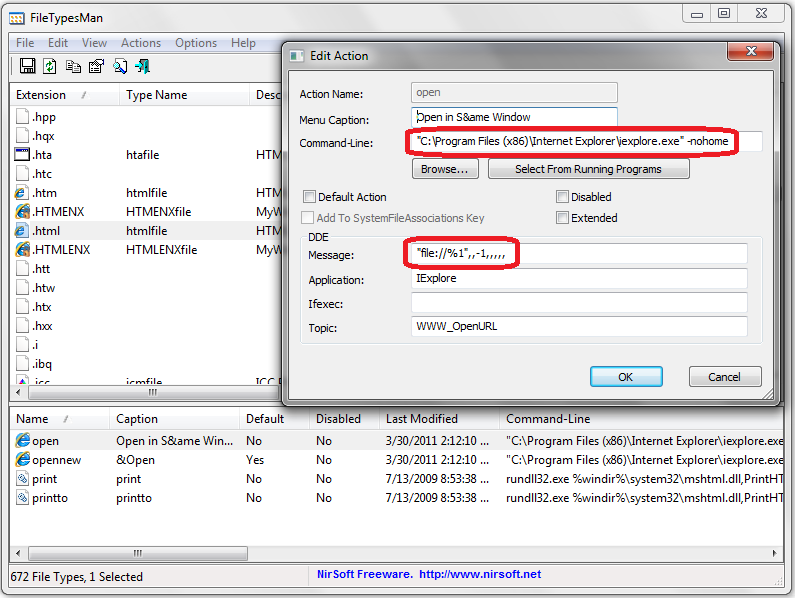
The more you understand basic DOS concepts, the better position you will be in as you manipulate Windows settings. In this example, you can see the command to execute IE with the switch "-nohome" on the command line. You can also see the use of "%1" replaceable parameter in the DDE message section. Is DOS dead? As an operating systems, yes. As a way to manage graphical elements under the hood, no. DOS is dead, long live DOS!
NOTE: Window 7 no longer allows you to see the file type. A program that will allow you to view file associations is FileTypesMan. It is free. See link for downloading.
iexplore.exe -nohome
Using FileTypesMan, you can see in this example for IE the absolute reference to the application and use of several switches. All the user sees is the file icon they need to click on to open their document.
file://%1
Note the use of the "%1" to pass replaceable parameters to the application the file to be opened in the DDE message section. "file://" is the system URI for referencing the local file system.
Thinking: How dependent are GUI objects on command line actions?
Key terms: application, icon, passing paremeters, switch
Resources:
To maximize your learning, please visit these Web sites and review their content
to help reinforce the concepts presented in this section.
Quick links:
FileTypesMan (free) @ cnet.com
Notes on navigation: Click inside the frame to navigate the embedded Web page. - Click outside the frame to navigate this page to scroll up/down between the embedded Web pages. - Click on the frame title to open that page in a new tab in most browsers. - Click on the the "Reload page" link to reload the original page for that frame.
FileTypesMan (free) @ cnet.com |
Reload page
|
If frame is empty, click on the link to view the page in a new tab or window
Sections: 1 | 2 | 3 | 4 | 5 | 6 | 7 | 8 | 9 | 10 | 11 | 12 | 13 | 14 | 15 | 16 | Index | Next >